Subscribe, Install, and Import are different
- Subscribe saves a Workshop Mod to your account. Open a Workshop listing and select Subscribe.
- Install stores the playable files in this browser. Return to PLAY, open Mods, and wait for the subscription to install. Clearing site data removes installed files; subscribed Workshop Mods can be installed again.
- Refresh Mods checks subscriptions and updates. Use it when a subscribed or replaced pack has not appeared.
- Import Mod reads a local ZIP or folder. It does not require an account, but you must keep your own copy because local imports are not recoverable from a subscription.
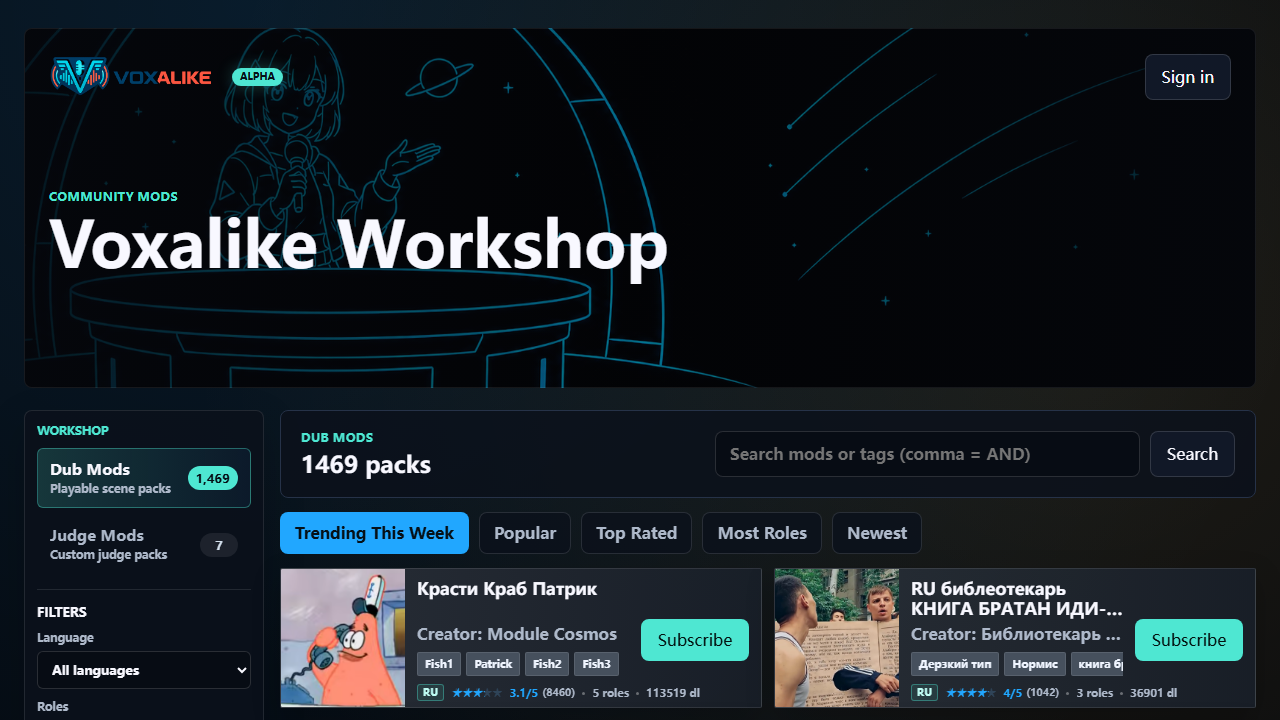
Choose a useful Mod
Dub Mods contain playable scenes, lines, captions, characters, and media. Judge Mods change judge art, names, feedback, and reaction sounds without changing the scoring rules.
Use language and role-count filters, then review the creator, uploader, character list, average rating, clip count, and preview when available. v1.5.0 adds Community Highlights for Featured Mods, Week's Most Played, and Popular New Mods, so treat those sections as discovery aids rather than permanent rankings.
Understand creator and rights information
Workshop packs are community submissions. The uploader must own the material or have permission to share it; attribution alone does not create permission. Creator and uploader can be different people, and current profile pages can show badges, creator statistics, published Mods, uploader links, and v1.5.0 creator badges.
Public listing text cannot contain external links. Misleading, duplicated, unsafe, or unauthorized uploads can be relabeled, hidden, or removed under the game rules.
Know when an account is needed
No account is required for local imported Mods. An account is required for Workshop subscriptions, ratings, uploads, profile features, and account benefits. Creator Workshop is opened from the signed-in profile menu.
If you clear browser site data, account subscriptions remain available, but installed Workshop files must be installed again and local Mods must be reimported.
Handle an unexpected external page
The game domain is voxalike.com. If an unexpected page asks for notifications, credentials, a CAPTCHA, a browser update, or an executable download, close it without interacting.
- Close the tab and cancel downloads. Do not enter an email, password, or verification code.
- Return by typing voxalike.com. HTTPS alone does not prove that a different domain belongs to the game.
- Remove notification permission if it was allowed. Use browser site settings, then report the preceding action and trusted page URL privately.
Report a Workshop or account problem
For listing or moderation concerns, record the Workshop URL, Mod name, uploader, action taken, visible error, browser, and time. For account-specific help, email support@voxalike.com. Copyright and removal requests should use the processes at Copyright and DMCA.
Send email addresses, recovery links, codes, session tokens, room codes, and account screenshots only through a private support channel.
Sources and changes
- Voxalike Workshop, FAQ, About, and release notes, checked 2026-08-30
- 2026-08-30: Reviewed against v1.5.0 Workshop notes; added Community Highlights, average ratings, and creator badge guidance.